ServusOne connects to QuickBooks Online, Xero and Zapier, so the customer you invoiced, the payment you took and the part you fitted arrive where they are needed as themselves — not as somebody's Friday afternoon.
What ServusOne connects to
Field operations, accounting and automation are three views of the same working day. ServusOne connects them so the work recorded on site becomes the invoice, the invoice becomes the accounting record, and the completed job can tell the rest of your tools about itself — once, in one direction, without a person retyping it.
Three connections carry that: QuickBooks Online and Xero for the books, and Zapier for everything else your office runs on. The depth goes into the service and accounting work, which is where duplicate entry actually costs you.
The connections
Each one is connected from your own settings screen, scoped by you, and disconnected by you.
QuickBooks Online
Keep your customers, invoices and payments aligned between the field and your books, without entering them twice.
Connect your QuickBooks Online company from Settings → Integrations. ServusOne asks QuickBooks for the accounting permission and nothing else, and you can disconnect it yourself at any time.
Customers and vendors are matched to the records they belong to in your QuickBooks company and kept aligned on the fields ServusOne owns, so the same business is one business on both sides.
Invoices raised in ServusOne move across to QuickBooks, and the accounting status recorded against them comes back — so what has been billed reads the same in the office and in the books.
Payments, credits and refunds reconcile into ServusOne's records with their amounts and origins intact, so the operational view of a job stops disagreeing with the financial one.
Service catalog items, purchase orders and jobs carry across as work your accounting side recognises, so a part ordered against a job and a part on the books are the same part.
You choose the scope: synchronization has a master switch and separate control over customers, invoices and payments, so you can start narrow and widen it as you trust what you see.
Xero
Connect ServusOne field-service workflows with Xero accounting and stop re-entering the same customers and invoices.
Connect your Xero organisation from Settings → Integrations. It runs on the same mapping, conflict and recovery engine as the QuickBooks Online connection, so it behaves the way the rest of ServusOne already behaves.
Customer and invoice information stays aligned between ServusOne and Xero, so the office is not maintaining two copies of the same record by hand.
The accounting subjects the release integration contract covers — contacts, items, purchase orders and invoices — carry across as themselves, keeping the parts and paperwork behind a job attached to it.
It is one engine, not a second integration bolted alongside the first: the same identity matching, the same conflict handling and the same recovery behaviour a team already relies on.
You connect it, you scope it, and you can disconnect it, from the same settings screen as every other connection.
Zapier
Connect ServusOne to the wider set of tools your business already runs on, and automate the handoffs between them.
Zapier is how ServusOne reaches the rest of your stack. ServusOne raises the event; your automation decides what should happen next, in the tools your team already has open.
Routine handoffs between ServusOne and the other applications a business runs on can be automated, so the step that depends on somebody remembering stops depending on it.
It is event-driven rather than a second synchronization: ServusOne reports that something happened, and your automation decides what that should trigger.
It extends your workflows outward without turning ServusOne into a connector directory — the depth stays in the service and accounting work, and the long tail is handled where it belongs.
The integrations surface is part of the Professional and Enterprise plans. Starter covers the core service operations without it.
Why this matters on an ordinary Tuesday
The office stops being a retyping department. In most service businesses the same customer is created twice, the same invoice is entered twice, and the same payment is reconciled by hand. That is not a small tax. It is a person's week, every week, spent producing a second copy of information you already had.
The handoff is where the money goes missing. Work that never reached the invoice, and invoices that never reached the books, are the two most expensive gaps in a field service business. A connection closes them by removing the step where a human has to remember.
The financial record stops disagreeing with the operational one. When the schedule, the work order and the ledger are updated by different people at different times, month-end becomes archaeology. Connected records mean the accounting view and the operational view are describing the same events.
The rest of your stack finds out on its own. Every business has its own handful of tools that should hear about a completed job — a spreadsheet, a mailing list, a reporting sheet, a chat channel. Automation carries that outward so the office is not the messenger.
Where the handoff actually happens
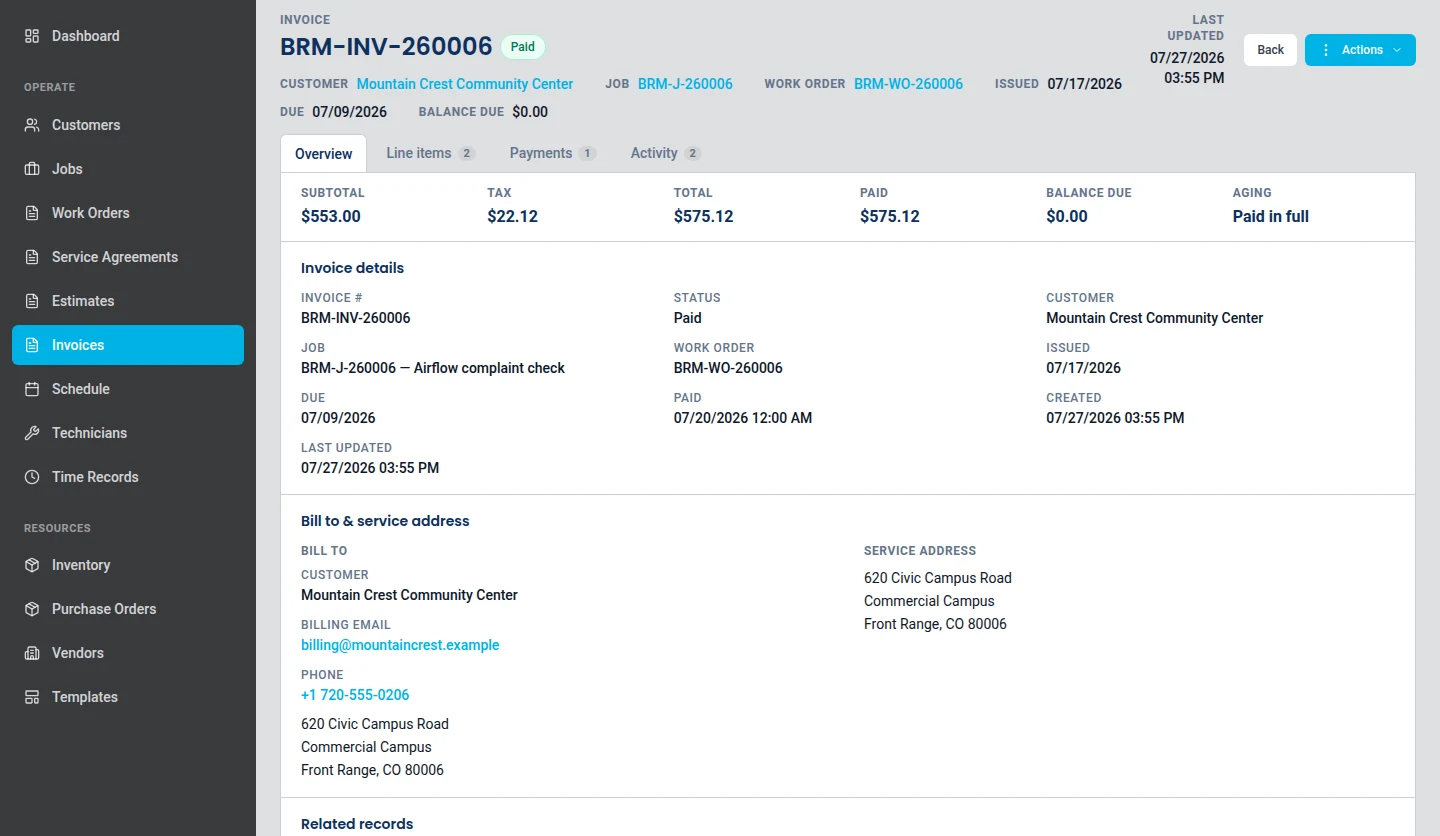
An invoice in ServusOne carries its payments and its remaining balance. That record is the one the accounting connections are built around.
An invoice with recorded payments and remaining balance. Product screenshot. Sample data is fictional.
How a connection behaves
You connect it, and you can disconnect it
Connections are made from Settings → Integrations by someone signed in to your company. Disconnecting revokes the access, invalidates the stored credentials, and stops queued work from the old connection before it can touch your accounting data.
It asks for accounting permission, and only that
The accounting connections request accounting access. They do not ask for payment processing, and they do not ask for payroll.
A match has to be provably the same record
A record in your accounting system is linked to yours on an exact email match. A similar name is a candidate for you to resolve, never an automatic link — because the failure mode of guessing is a merged customer in your accounting system, and that is not a mistake anyone enjoys unpicking.
Conflicts stop rather than overwrite
If your accounting system holds a newer version of a record than ServusOne last saw, that is treated as a conflict needing attention, not as permission to overwrite. Retries are idempotent, so a repeated attempt cannot create a second invoice.
Credentials are never yours to worry about twice
Tokens are encrypted at rest and are kept out of logs, audit records, queue payloads and API responses. Token refresh is locked per company so two workers cannot fight over a rotation.
Where a connection stops
Worth knowing before you connect, so nothing behaves in a way you did not expect.
It is an accounting connection, not a payments one. Payment capture inside your accounting system is not part of this. Payments taken through ServusOne remain owned by the payment processor that took them.
Payroll stays with your payroll provider. Time records are captured and exported by ServusOne, but no payroll data is submitted to a payroll system through these connections.
It will not invent accounts or tax codes. Where an item needs an accounting or tax reference your accounting company does not have, synchronization stops and tells you what is missing rather than creating something plausible on your behalf.
Straight answers
Which accounting packages can I connect?
QuickBooks Online and Xero. You connect your company or organisation from Settings → Integrations, and you choose which of customers, invoices and payments are included.
Do I have to sync everything?
No. Synchronization has a master switch and then separate switches for customers, invoices and payments, so you can start with customers alone and widen it once you trust what you are seeing.
What happens to a customer that already exists in both systems?
It is linked rather than duplicated, provided the email addresses match exactly. Anything less certain than that is shown to you as a candidate to confirm, because an automatic guess would be a merged record in your books.
What does the Zapier connection let me do?
It lets ServusOne tell the rest of your tools that something happened, and lets your automation decide what should follow. That is how routine handoffs between ServusOne and the applications your office already uses get done without a person carrying them.
Can I connect more than one at a time?
Your books live in one place, so you connect the accounting package your business actually uses. The automation connection is separate from that choice and works alongside it.
Which plans include it?
The integrations surface is part of Professional and Enterprise. Starter covers core service operations without it.
QuickBooks Online, Xero and Zapier are trademarks of their respective owners. Third-party names and logos remain the property of those owners, are used here to describe the services ServusOne connects to, and do not imply endorsement, sponsorship, certification or approval of ServusOne by them.