
How to evaluate field service software without being sold to
Feature grids are designed to be won. These are the questions that separate products that look identical on paper.
The short answer
Most field service systems can schedule a job, send an estimate and raise an invoice. Those capabilities will not separate your shortlist, because every product on it has them. What separates them is what happens on the second visit, who has to have a login, what the system refuses to do, and what the price becomes once your real headcount is on it.
Run the evaluation in that order and you will usually find the decision makes itself in a week. Run it as a feature comparison and you will spend a month producing a grid that every vendor wins.
Start with the second visit, not the first
Every product demos the first job well: a new customer, a clean schedule, an estimate that becomes an invoice. Nobody's first job is the problem. The problem is the fourth visit to the same site, eighteen months later, by a technician who was not on the previous three.
So run that scenario in every trial. Create a customer, do a job, record parts and notes against it, then come back later and ask what the technician sees when they open the record. Some systems will show you the whole history on the customer and the equipment. Others will make you go looking. That difference compounds for as long as you own the software.
Ask where equipment lives
If you service installed units, ask whether the system records the unit itself — make, model, serial — and attaches service records to it, or whether equipment is just text typed into a job note.
Ask what a technician sees, not what an admin sees
The office view is always good in a demo. Ask to see the same record from the field, on the plan you would actually buy.
Count logins, not technicians
Field service pricing is usually built around technicians, because that is the number that grows. But dispatchers, office administrators, bookkeepers and owners all need access, and they are frequently forgotten until the quote arrives.
Write down every person who will open the system in a normal week. Then price each product against that number, including what an additional seat costs once the included ones are used. Two products with similar headline prices can differ substantially once your real list is priced.
Find out what each product refuses to do
A vendor who cannot name a limitation is either not being straight with you or does not know their own product. Ask directly: what do customers most often ask for that you do not do?
It is worth being specific about the capabilities buyers most often assume are universal and are not. Vehicle location is the clearest example: some products track vehicles and some do not offer it at all, and no feature grid will make that obvious because absence does not get a row. ServusOne, for instance, offers no GPS tracking, no technician location and no telematics, and does not compute optimized routes — that is stated plainly on the feature pages rather than left for you to discover during a trial.
Accounting is the second. Ask whether there is a supported, published integration with the books you actually keep, and treat a roadmap answer as a no.
The mobile plan trap
Mobile access for technicians is not always on the plan its price suggests. Find out which tier provides it in each product before you compare cost at all — it moves the comparison more than most features do.
The integration roadmap trap
“Coming in a future release” is not a capability you can plan around. Buy what exists today and treat anything else as upside.
Run a trial that can fail
A trial where you click around for an afternoon tells you nothing. Pick one real week of your actual work — a genuinely busy one, not a quiet one — and run it in parallel through the trial. Enter the real jobs. Use the real customer names. Raise the real invoices.
Two things come out of this that a demo never surfaces. You find out how long routine data entry takes when you are not being guided, and you find out which steps your staff quietly refuse to do. A system that requires a step your team will not perform is not a system you own; it is a system you will fight.
Decide what you are actually buying
Broadly, products in this category lean one of two ways. Some are strongest at winning work: online booking, review collection, consumer-facing polish. Others are strongest at running work: scheduling depth, job costing, service history, approvals.
Neither is better in the abstract. But your business has a bottleneck right now, and it is almost certainly one or the other. Name it honestly before you shortlist, and weight your evaluation towards products that are strongest where you are weakest. Buying acquisition software when your problem is operational chaos is the most common expensive mistake in this category.
A useful forcing question: if this software worked perfectly tomorrow, what would change about the business? If the answer is “we would book more of the calls we already get”, you are buying acquisition. If it is “we would stop losing money on the jobs we already do”, you are buying operations. Those are different products and the shortlists barely overlap.
Ask what happens to your data on the way in and out
Two questions get skipped in almost every evaluation, and both are expensive later. The first is what happens to the customer list, the job history and the open balances you already have. Ask specifically what the import covers, what it does not, and whether historical jobs come across or only current customers. “We can help with that” is not an answer; ask what the import file looks like.
The second is what happens if you leave. Ask what you can export, in what format, and whether that includes the things you would actually need — customers, job history, invoices, attachments. A product that imports easily and exports poorly is a product you will still be paying for in four years because leaving costs more than staying.
Neither question is hostile and no reasonable vendor treats it that way. The reaction to being asked is itself information.
Test the import before you commit
Ask to run your real customer list through the import during the trial rather than after signing. What comes out the other side is the most honest thing you will see in the whole evaluation.
Ask for a reference you chose
Every vendor has references and every one of them is happy. That is not dishonesty; it is selection. The useful version is to ask for a reference that matches your constraints rather than one that matches their best case — your trade, roughly your size, and ideally somebody who switched from whatever you are running now.
When you get the call, skip the feature questions. Ask three things instead: what took longer than expected during setup, what the team complained about in the first month, and what they would still like the product to do that it does not. Those answers describe living with the software, which is what you are actually buying.
If a vendor cannot produce a reference resembling your business, that is worth knowing too. It does not disqualify them — a newer product genuinely may not have one — but it should change how much of your evaluation you spend on the trial rather than on their case studies.
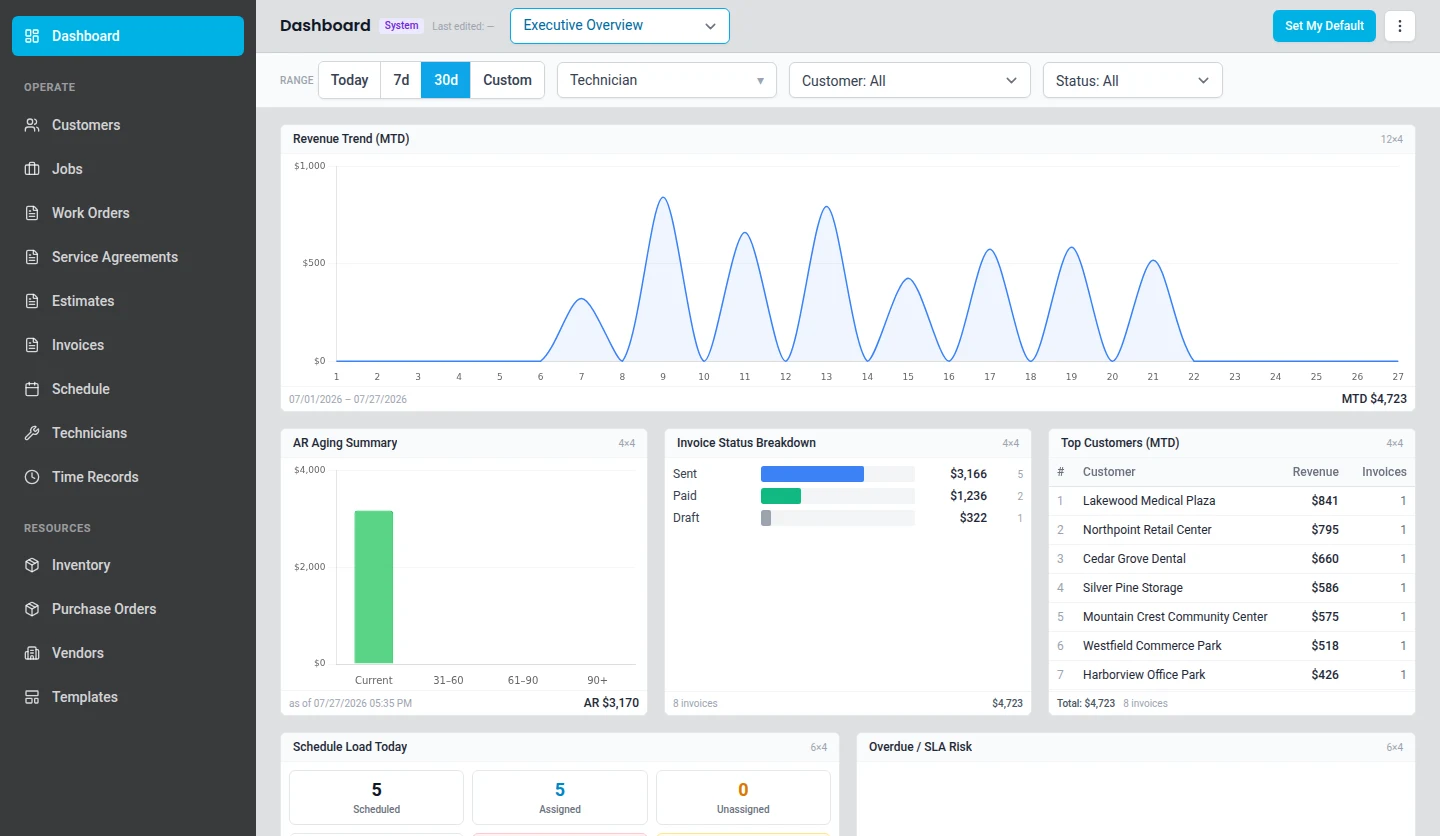
What this looks like in ServusOne
Where to go next
Book work, assign it, and keep the board accurate when the day changes.
Equipment and service historyMake, model, serial, and every visit against the unit.
Reporting and analyticsWork, revenue, receivables, and hours from your own records.
HVACEmergency callouts and planned maintenance on one board, with unit history on every site.
PlumbingFast dispatch for emergencies, with the fittings used recorded on the job.
ServusOne vs ServiceTitanFor teams weighing a quoted enterprise platform against published plan pricing.
ServusOne vs JobberFor teams comparing seat-based plans and deciding how much history they need.
ServusOne vs Housecall ProFor teams weighing consumer-facing booking against operational depth.
Ready to try it against your own week?
The trial runs for fourteen days and does not ask for a card, so you can put a real week of work through it before deciding anything.